Kickstart Your Product Redesign in the era of AI: The Essential 5-Step UX Guide


Intro
So, you’re thinking about a full product redesign. Your current design feels outdated, a bit old-school, and clearly hasn’t been refreshed for a while. As the product grew, inconsistencies piled up, and now the experience feels fragmented and hard to control. You notice it every time you compare yourself to competitors — scrolling through their websites or catching their ads — and it feels like you’re falling behind. Sounds familiar?
But is a redesign always the answer? And can redesign alone really fix everything?
In this guide, we break down a <span class="rich-underline-bold">proven 5-step product redesign approach</span> that helps businesses create changes that are not just visually appealing, but meaningful, scalable, and driven by real business goals.
Why product redesigns fail
(and How to Avoid It)
Product redesign promises transformation—better engagement, higher conversions, happier users. But too often, it delivers the opposite: confused customers, plummeting metrics, and teams scrambling to undo the damage. The difference between redesigns that succeed and those that fail isn't luck. It's the process.
The most common failure patterns include redesigning based on opinions rather than user data, changing interfaces without improving underlying experiences, and rolling out massive overhaul without proper validation. Each of these mistakes stems from skipping foundational research and strategy work in favor of moving fast.
Often redesigns fail when:
- Decisions are based on opinions, not data.
- Users are excluded from the process.
- Design is detached from business KPIs.
- Teams focus on “how it looks” instead of “how it works”.
- Decisions are based on opinions, not data.
- Users are excluded from the process.
- Design is detached from business KPIs
A structured UX-driven approach helps avoid these pitfalls.
When Product Redesign Is Necessary
Not every product needs a complete overhaul.
The Nielsen Norman Group distinguishes the following scenarios for doing the radical overhaul:
- <span class="rich-underline-bold">First, when your previous incremental changes have failed to move key metrics </span> despite consistent effort. This signals systemic issues that surface-level fixes can't address.
- Second, <span class="rich-underline-bold">when your technology is severely outdated </span> and your backend systems physically can't support the user interactions your customers expect.
- Third, when <span class="rich-underline-bold">you're actively losing customers</span> to competitors with demonstrably superior experiences.
If none of these conditions apply, consider a phased approach instead. Incremental improvements let you validate changes continuously, reduce risk, and maintain user familiarity while still evolving your product meaningfully.
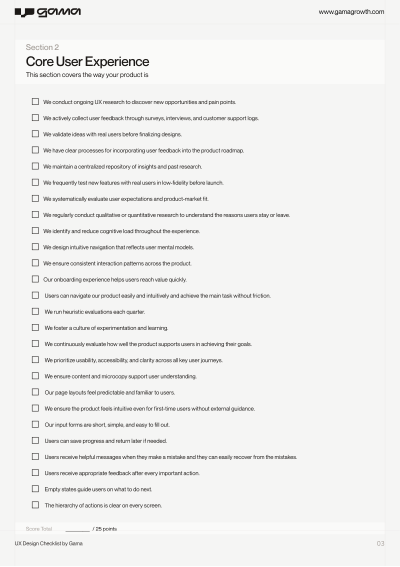
Download our UX design checklist below to identify potential gaps.
{{article-checklist="/banners"}}
Step 1: Define the Real Problem
Every redesign should start with clarity. The first thing to determine is why a redesign is needed at all. Is it driven by stakeholder preferences and ego, or by objective evidence that the current design is failing to deliver revenue, growth, or engagement?
Instead of asking: “How do we modernize the interface?”, “Can we make it more trendy?”, ask yourself the following questions:
{{article-banner-1="/banners"}}
These questions shift your focus from aesthetics to impact. A redesign without clear answers to these questions is just expensive guesswork.
What should business do?:
- Start by mapping your customer journey to pinpoint exactly where users struggle or abandon your product. A detailed customer journey map (CJM) visualizes every touchpoint in your user's experience, from initial awareness through ongoing use. Plot out each stage, identify where drop-offs occur, and document the emotions, pain points, and motivations at each step.
- Pay special attention to the data. Where do conversion rates drop? Which features have the highest abandonment? What actions correlate with churn? These friction points reveal opportunities, but they're not problems yet—they're symptoms. Your job is to dig deeper and understand why these breakdowns happen.
- Next, establish concrete metrics that define success. Are you optimizing for growth, retention, conversion, or operational efficiency? Different goals require different design strategies. A redesign focused on increasing conversion rates looks fundamentally different from one aimed at improving long-term retention.
- Be specific. Don't say "improve user experience." Say "reduce checkout abandonment from 68% to 45%" or "increase feature adoption from 12% to 30% within 90 days of signup." Document baseline measurements so you can track improvement objectively.
Key UX Artifacts for This Step:
- CJM with drop-off analysis
- Analytics dashboard highlighting key metrics
- Problem statement document
{{article-banner-2="/banners"}}
Step 2: Research Your Users deeply
Assumptions kill redesigns. Even when you think you know your users, their actual behavior often contradicts your expectations. Deep user research transforms opinions into evidence.
Conduct in-depth interviews with current users, churned customers, and people who match your target profile but haven't adopted your product. These conversations uncover the "why" behind behavior—motivations, frustrations, and unmet needs that analytics alone can't reveal. Ask about their workflows, pain points, and what they've tried to accomplish with your product. Listen for the problems they're trying to solve, not the features they request.
Combine qualitative insights with quantitative data from analytics, heatmaps, and session recordings. Look for patterns in how people actually use your product versus how you intended them to use it. These gaps often reveal fundamental design problems.
Formulate specific hypotheses based on your research. For example: "Users abandon the checkout process because the shipping cost appears too late" or "New users struggle with onboarding because key features aren't discoverable." These hypotheses give you clear targets to address in your redesign and concrete ways to measure whether your solutions work.
Build user personas that represent your key audience segments, grounded in real research data rather than assumptions. Create empathy maps to visualize what users think, feel, say, and do. Document user flows showing how people currently navigate your product and where they encounter obstacles.
Key UX Artifacts for This Step:
- In-depth interviews
- Transcripts and synthesis
- Empathy maps
- Research-based hypothesis document
- Heatmaps and session recording analysis
{{article-contact-us-1="/banners"}}
Step 3: Consider Improving Experience Before UI
Here's an uncomfortable truth: most products don't need better interfaces. They need better experiences.
Visual redesigns are seductive because they're visible and feel productive. But slapping fresh paint on a fundamentally broken experience wastes resources and disappoints users. Before touching your UI, examine whether you can solve problems by improving the underlying experience architecture.
Can you eliminate steps from complex workflows? Remove features that few people use but everyone has to navigate around? Restructure information to match how users actually think about their tasks? Improve system performance so actions feel more responsive? Often, these experience-level improvements deliver dramatically better results than any visual update could.Conduct a content audit to evaluate whether your information architecture makes sense. Create card sorting exercises with actual users to understand how they mentally categorize your product's features and content. Build an updated site map or information architecture diagram that reflects user mental models rather than internal organizational structure.
Map out future-state user flows that eliminate unnecessary steps and streamline key tasks. Create service blueprints that show not just the user-facing experience but also the behind-the-scenes processes, systems, and touchpoints that support it. This helps you identify where technical or operational improvements are needed to enable a better user experience.
Consider what information architecture, content hierarchy, and interaction patterns might need to change regardless of visual style. Sometimes the best redesign is the one that makes your interface simpler and more invisible, letting users focus on their goals instead of your product.
Step 4: Design the Interface & System (UI + Design System)
With a solid experience foundation in place, you can now focus on the interface layer—not as decoration, but as the systematic visual expression of your product's logic and personality.Adopt an atomic design approach, building from the smallest components upward. Start with foundational elements like color palettes, typography scales, spacing systems, and basic UI elements such as buttons, form fields, and icons. These atoms combine into molecules—more complex components like search bars or card layouts. Molecules form organisms such as navigation headers or product grids. This systematic approach ensures consistency and makes your design scalable.
Create wireframes that focus on structure and hierarchy before introducing visual design. Build interactive prototypes that let stakeholders and users experience the redesigned flows before development begins. This is your chance to identify usability issues while changes are still inexpensive to make.
Your design system should extend beyond a component library to include clear brand guidelines. Resources like the Memorisely brand guide offer frameworks for defining visual identity—your brand's personality, voice, and aesthetic principles. Strong brand expression differentiates your product and creates emotional connection, but it should enhance usability rather than compromise it.
Develop a comprehensive style guide that documents your design tokens (colors, spacing, typography), component usage, accessibility standards, and interaction patterns. Create high-fidelity mockups that show how the system comes together in real product screens.Document design patterns and usage guidelines as you build. This documentation becomes invaluable for maintaining consistency as your team grows and your product evolves. Include not just what components exist, but when and how to use them appropriately.
Step 5: Validate & Drive Continuous Improvement
Launch is not the finish line—it's when the real learning begins.
Before rolling out your redesign to everyone, validate your solutions with actual users. Conduct usability testing with people who match your target audience. Watch them attempt realistic tasks with your redesigned product. Pay attention not to whether they like the new design aesthetically, but whether they can successfully accomplish their goals more easily than before.Create a usability testing plan that outlines test scenarios, success criteria, and key metrics you'll track. Document test results in detailed reports that highlight both successes and areas needing improvement.
Use A/B testing for critical flows and features where possible. This lets you compare the new design's performance directly against the existing version using your established metrics. Don't rely on vanity metrics—focus on the same success criteria you defined in step one.Plan a phased rollout rather than a big-bang launch. This minimizes risk and gives you opportunities to catch and fix problems before they affect your entire user base. Start with a small segment of users, monitor metrics closely, gather feedback, and iterate before expanding.
Post-launch, establish systems for continuous monitoring and improvement. Track your key metrics to ensure the redesign achieves its intended goals. Collect ongoing user feedback through surveys, support tickets, and user interviews. Set a regular cadence for reviewing this data and making iterative improvements.
Ready to Transform Your Product?
Product redesign is complex, high-stakes work that requires the right expertise and process. If you're considering a redesign but unsure where to start, we can help.
Our UX design agency specializes in research-driven redesigns that deliver measurable results.
We'll work with you to:
- Uncover the real problems through comprehensive user research and analytics
- Design experiences that align with how your users actually think and work
- Build scalable design systems that grow with your product
- Validate solutions before you commit development resources
- Drive continuous improvement with data-informed iterations
Whether you need support at a specific stage or a full end-to-end redesign partnership, we bring the strategic thinking and design craft to make your redesign successful.
Contact us today to discuss your product redesign goals and how we can help you achieve them.